Explore Weekly & Monthly Views in Google Search Console
Learn how to use weekly and monthly views in Google Search Console to analyze traffic trends, compare periods accurately, and track long-term SEO performance.
2 minutes read
Learn how to use weekly and monthly views in Google Search Console to analyze traffic trends, compare periods accurately, and track long-term SEO performance.
2 minutes read
Author:
Sanober Awan
Updated:
December 29, 2025
Analyzing search traffic trends is an important aspect of SEO, Daily data helps you spot sudden issues, or traffic changes, but it does not always show the full picture. Because traffic goes up and down every day.it can be difficult to determine whether a website is truly expanding or losing traffic over time.
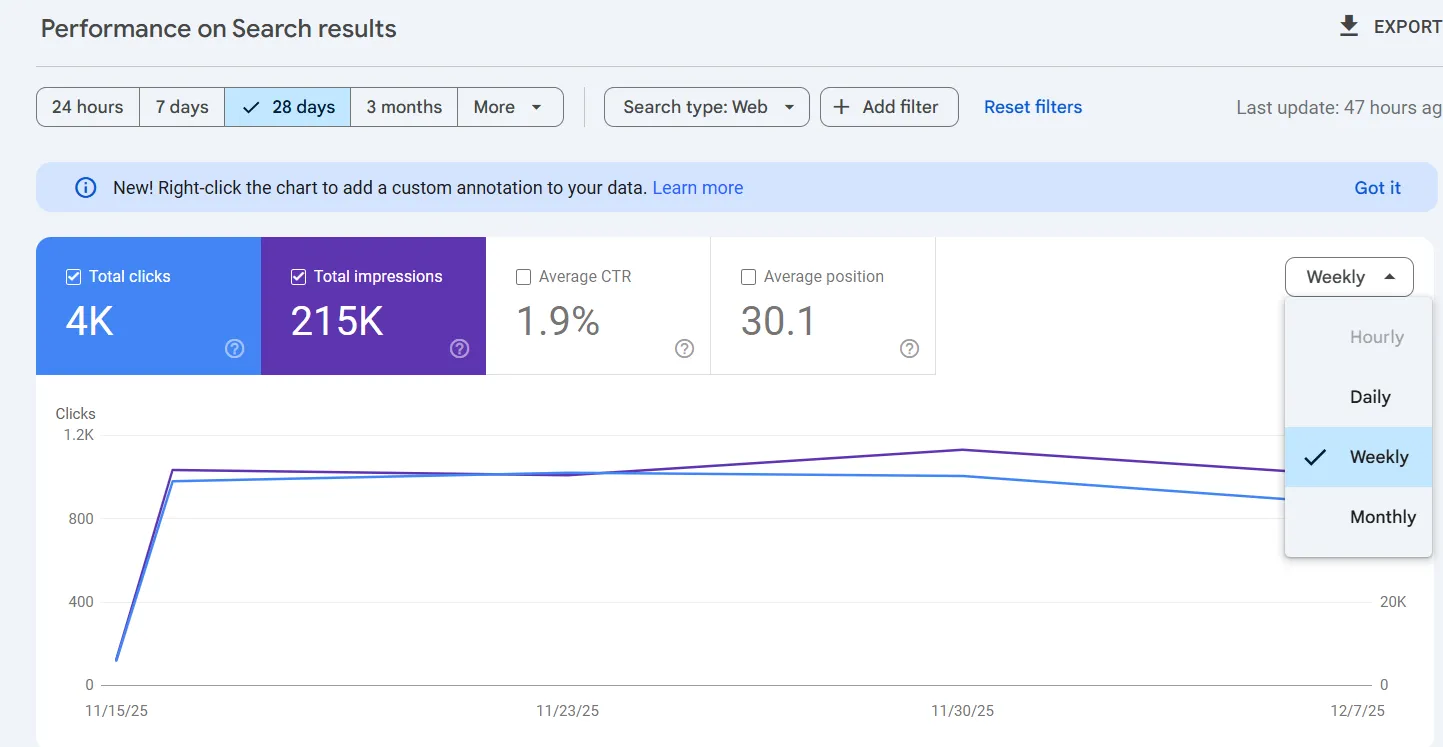
Before, the Performance report in Search Console only showed daily data. Now, Google has introduced a new feature: weekly and monthly views. This feature lets you change how time is shown in the charts, so you can reduce daily changes and focus on the overall traffic trend of your website.
You can access this option in the chart section of the Performance report for Search results, Google News, and Discover. Simply click the drop-down menu that says “Daily” and select either Weekly or Monthly. The chart will update instantly. This feature is especially useful when comparing different time periods. For example, comparing the last three months with the previous three months can be confusing because weekends don’t line up. Weekly or monthly views make these comparisons much clearer.
Keep in mind that exported data files may look slightly different. File names, tabs, column titles, and sorting may change depending on the selected view. Weekly and monthly views are now available to all Search Console users worldwide.
This update makes it easier to understand your data and track long-term traffic trends.

No comments yet. Be the first to post!